
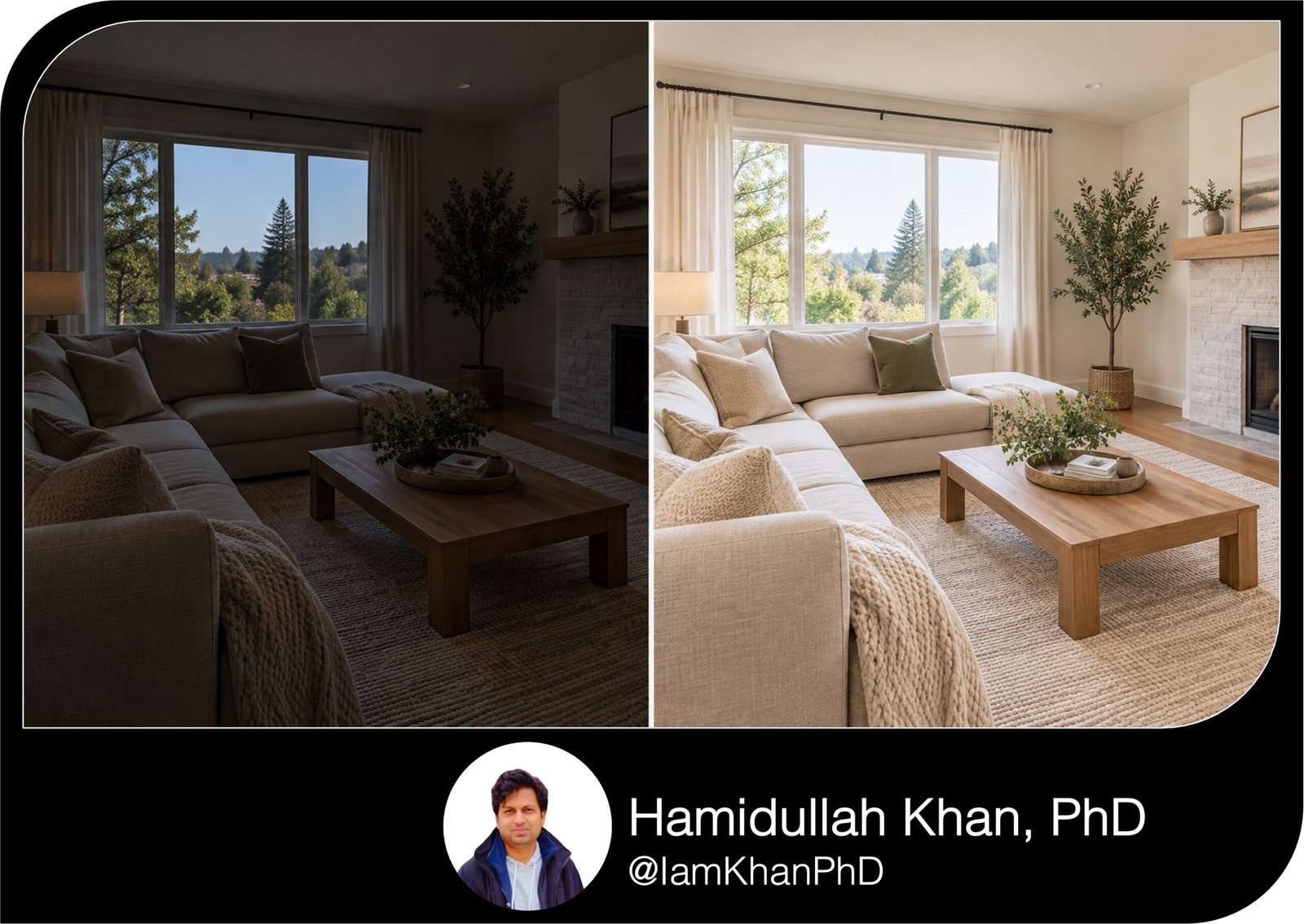
10 AI Photo Editing Prompts for Brightening Dark Listing Interiors
Make dark listing interiors easier to see with 10 detailed, editable AI photo editing prompts for real estate agents. Tackle bright windows, yellow kitchen lighting, dim bathrooms, shadowy basements, and grainy phone photos. Each prompt includes simple customization fields and instructions to preserve the property’s features and visible condition.
What This Prompt Pack Does
- Provides 10 targeted prompts for common dark-interior listing photo problems.
- Guides brightness, shadow, glare, and color corrections while preserving existing property details.
- Includes editable fields for room type, problem area, finishes, and correction strength.
Tips for This Prompt Pack
- Use the highest-quality original photo available and start with a gentle correction.
- Describe the exact dark area and supply known wall or finish colors when correcting a color cast.
- Compare each edit with the original; reject changes to layout, views, finishes, or visible condition.
How to Use the Prompts
- Upload a listing photo to an AI tool that supports editing existing images.
- Choose the matching prompt, replace the [bracketed fields], and submit it with your photo.
- Review the result and request a smaller correction if needed; save the approved image and retain the original.
10 AI Prompts for Property Listings I Custom Prompt Pack
10 AI Photo Editing Prompts for Brightening Dark Listing Interiors
Upload your original listing photo to an AI tool that supports editing uploaded images. Choose a prompt below and replace the [bracketed fields] with your details.
10 AI Prompts for MLS Descriptions from Property Notes
1. Brighten a Living Room Without Blowing Out the Windows
Best for: A living room that looks dark because the camera exposed for the bright windows.
Prompt:
Edit the uploaded photo of this [living room/family room]. The windows are bright, but [the sofa area/the fireplace wall/the entire interior] is underexposed. Brighten the interior with a [gentle/moderate] exposure adjustment, concentrating on the darker areas instead of brightening the whole image equally. Keep believable shadows under furniture and in corners. Preserve visible detail in the windows and the original outdoor view; do not replace the view or invent details in washed-out areas. Keep the actual colors and textures of [wall color], [floor material], and [furniture]. Do not add sunlight, lights, furniture, or architectural features, or hide visible wear. Keep the original framing and room proportions. Return one edited image with no text.
10 AI Prompts for Real Estate Flyers & Brochures
2. Brighten a Kitchen and Reduce a Yellow Color Cast
Best for: A dim kitchen photographed under warm ceiling lights.
Prompt:
Edit the uploaded kitchen photo to improve brightness and reduce the excessive yellow/orange cast from the existing lighting. Focus on [the countertop workspace/the island/the cabinet fronts]. Use [slight/moderate] color correction while retaining some natural warmth. The [walls/cabinets] are actually [cream/white/other known color]; use that information as a reference without repainting them digitally. Make existing countertop and backsplash detail easier to see without bleaching surfaces or creating a glossy finish. Preserve the real cabinet finish, wood grain, appliance colors, grout, and visible condition. Control glare on [stainless steel appliances/polished counters]. Do not replace fixtures, remove marks, or add under-cabinet lighting. Keep the original camera angle and framing. Return one natural-looking edited image with no text.
10 AI Prompts for Property Listing Email Announcements
3. Lift a Bedroom Photographed on a Cloudy Day
Best for: A bedroom that appears dull and gray in overcast daylight.
Prompt:
Edit the uploaded photo of this [primary/guest/children’s] bedroom, photographed on an overcast day. Increase brightness by a [gentle/moderate] amount, especially around [the bed/the far wall/the wardrobe]. Keep the light soft and consistent with the existing window direction. Reduce the dull gray cast without making the image yellow or turning it into a sunny-day scene. Preserve the real colors of [wall color], [bedding color], and [floor material], including the texture of curtains and bedding. Keep natural shadows so the room retains depth. Do not add sunbeams, change the view, digitally open curtains, alter furniture, or remove visible defects. Preserve the original proportions and framing. Return one edited image with no text.
10 Custom AI Prompts for Real Estate Listing FAQs
4. Brighten a Windowless Bathroom Without Harsh Glare
Best for: A bathroom lit only by vanity or ceiling fixtures.
Prompt:
Edit this uploaded photo of a windowless [full bathroom/powder room]. Brighten [the vanity/the shower enclosure/the entire room] using a [gentle/moderate] correction that looks consistent with the existing artificial lights. Make dark tile and vanity details easier to see while preserving their actual colors. Reduce distracting glare on the mirror, chrome, and glossy tile without changing reflected objects or erasing fixtures. Keep tile grout, surface texture, stains, chips, and other visible condition details intact. Do not add a window, daylight, fixtures, or a stronger light source that the room does not have. Avoid making dark grout white or changing the tile finish. Keep the original framing and room dimensions. Return one edited image with no text.
10 AI Prompts for Translating Property Listings into Plain English
5. Improve Visibility in a Dim Basement or Lower-Level Room
Best for: A finished basement that looks much darker in the photo than it does in person.
Prompt:
Edit the uploaded photo of this [finished basement/lower-level recreation room]. Improve visibility in [the seating area/the rear wall/the space beneath the stairs] with a [gentle/moderate] shadow lift. Keep the result believable for a room with [small basement windows/existing ceiling fixtures/both]. Preserve natural darker areas and the actual ceiling height. Keep wall texture, flooring, exposed beams, vents, pipes, and visible condition unchanged. Reduce grain only enough to improve the image without smoothing away surface details. Do not add windows, increase window size, remove moisture marks, or make the room appear to receive more daylight than shown. If an area contains no recoverable detail, leave it naturally dark instead of inventing objects or finishes. Return one edited image with the original framing and no text.
10 Real Estate AI Prompts for Consistent Listing Copy
6. Brighten a Dining Room While Preserving Dark Wood Finishes
Best for: A dining room where dark furniture, paneling, or flooring dominates the exposure.
Prompt:
Edit the uploaded photo of this dining room with [dark wood furniture/wood paneling/dark hardwood flooring]. Brighten the room by a [gentle/moderate] amount, focusing on [the walls/the table area/the far corner]. Preserve the deep tones of the wood; do not turn them pale, gray, or orange. Reveal existing grain and texture without making the wood look refinished. Keep [wall color] and [upholstery color] consistent with the source image. Reduce excessive contrast between the lit area and the shadows while retaining depth and natural chandelier warmth. Preserve scratches, wear, and all existing objects. Do not change the finish, add lights, or alter the room’s size. Keep the original framing and return one edited image with no text.
10 AI Virtual Staging Prompts for Empty Living Rooms
7. Balance Bright and Dark Areas in a Hallway or Entryway
Best for: An entryway or corridor with a bright doorway and a dark interior.
Prompt:
Edit this uploaded [hallway/entryway/stair landing] photo. The area near [the front door/the window/the ceiling light] is bright, while [the corridor/the stairs/the coat-storage area] is too dark. Selectively lift the darker areas and control the brightest highlights for a balanced, natural exposure. Keep a believable falloff in light as the hallway extends away from the light source. Preserve the exact placement of doors, railings, steps, trim, and fixtures. Keep actual paint and flooring colors, along with visible wear and condition. Do not widen the hallway, extend it, straighten it by changing its geometry, or reveal invented spaces through doorways. Keep the original camera position and crop. Return one edited image with no text.
10 AI Virtual Staging Prompts for Small Bedroom Property Listings
8. Correct Uneven Lighting in an Open-Plan Living and Kitchen Area
Best for: One photo containing cool window light and warm kitchen lighting.
Prompt:
Edit the uploaded photo of this open-plan [living room and kitchen/living and dining area]. The [window-side seating area] looks [blue/gray], while the [kitchen/dining area] looks [yellow/orange]. Brighten the darker zone, [describe area], and gently reduce the distracting color difference between the zones. Retain the believable warmth of existing lamps and the cooler character of daylight; do not force every area to the same color. Keep the actual colors and finishes of [walls], [cabinets], and [flooring]. Preserve highlights, realistic shadows, and the original outdoor view. Do not add lighting, change furniture or architecture, or hide damage. Keep the original framing and proportions. Return one balanced edited image with no text.
10 AI Prompts for Correcting Window Glare in Real Estate Photos
9. Brighten a Grainy Smartphone Interior Photo
Best for: A dark phone photo that becomes noisy when brightened.
Prompt:
Edit this uploaded smartphone photo of a [room type]. Improve visibility in [specific dark area] using a conservative exposure adjustment. Prioritize a believable result over maximum brightness. Reduce distracting grain in broad areas such as walls and ceilings while preserving floor texture, fabric weave, grout lines, and visible condition. Use light sharpening only where detail already exists; avoid bright outlines, waxy surfaces, and exaggerated clarity. Preserve the original wall, flooring, and furniture colors. If a shadow contains too little information, leave it subdued instead of generating missing details. Do not remove defects, replace objects, or alter architecture. Keep the original crop and image proportions. Return one edited image with no text.
10. Match Brightness Across Multiple Photos of the Same Room
Best for: Different angles of one room looking inconsistent in a listing gallery.
Prompt:
I have uploaded [number] photos of the same [room type]. Use [identify reference photo by filename or upload order] as the reference for natural brightness and color. Brighten the darker photos to approach that reference while respecting each angle’s actual light direction, shadows, and window exposure. Keep the color of [wall color], [floor material], and [cabinet or furniture finish] consistent across the images. Do not copy objects or details between photos, change the outdoor views, add lights, or hide visible condition. Preserve each photo’s original framing and proportions. Return a separate edited image for each photo, with no text or collage. If multiple-image editing is unavailable, edit only [target photo] using the reference image for brightness and color guidance.
About author






Add comment