
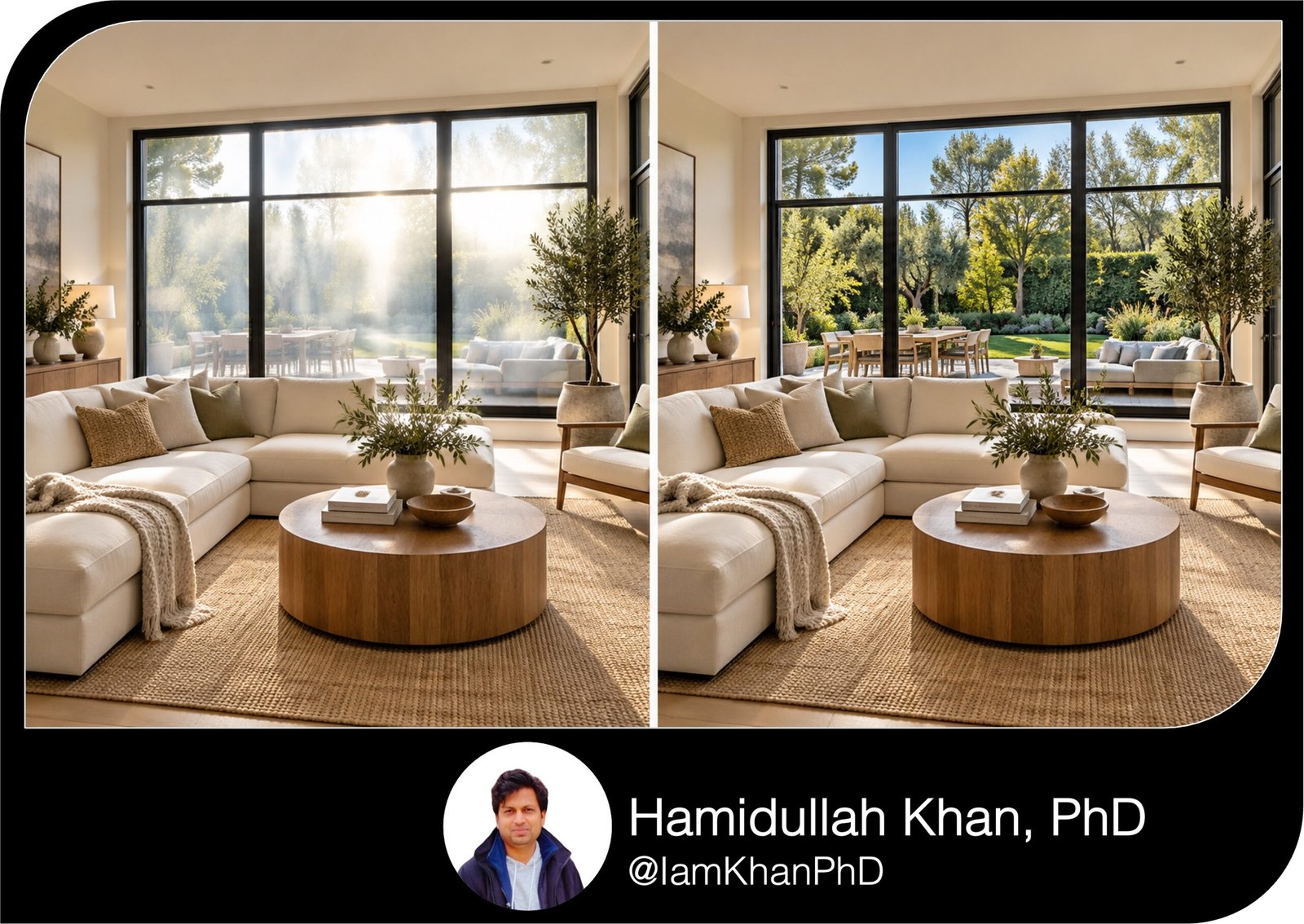
10 AI Prompts for Correcting Window Glare in Real Estate Photos
Improve distracting window glare in listing photos with 10 detailed, editable AI prompts made for real estate agents. Tackle bright windows, reflected lights, glass-door glare, and more with clear copy-and-paste instructions that prioritize the property’s actual appearance. Designed for beginners using an AI photo-editing tool.
What this prompt pack does
- Provides targeted editing instructions for 10 specific window-glare problems in real estate photos.
- Guides the AI to preserve room details, window structure, natural lighting, and actual outdoor views.
- Includes a reference-photo prompt for restoring obscured window views from a matching darker exposure.
Tips for this prompt pack
- Describe the exact area: “the upper-right pane above the sofa” is clearer than “fix the windows.”
- Start with subtle correction; use a matching darker photo when the outdoor view is completely washed out.
- Compare the result with the original before posting, checking window edges, exterior features, and property details.
How to use the prompts
- Open an AI tool that supports editing uploaded photos and upload your original listing image.
- Choose the matching prompt, replace every [bracketed field], and attach a reference photo when requested.
- Run the edit, review the result, and download the approved image; request a smaller correction if it looks unnatural.
10 AI Prompts for Property Listings I Custom Prompt Pack
10 AI Prompts for Correcting Window Glare in Real Estate Photos
Replace the [bracketed fields], upload your original photo to an AI tool that supports photo editing, and paste the relevant prompt.
10 AI Prompts for MLS Descriptions from Property Notes
1. Reduce a bright white patch on a window
Best for: A bright window distracting buyers from the room.
Edit the attached real estate photo of [room type]. Reduce the bright glare on [identify the window and affected area, such as the upper half of the left window]. Use a [subtle/moderate] correction. Adjust only the affected window highlights so the window feels naturally bright without dominating the room. Retain the outdoor details already visible, including [trees/buildings/patio/other visible features]. Keep the room’s brightness, wall colors, furniture, window frame, and camera angle unchanged. Do not turn the glass gray or add a new outdoor scene. If an area is completely white and contains no usable detail, do not invent what is outside. Leave that area naturally bright and tell me whether a darker reference photo is needed. Return the edited photo and briefly explain the correction.
10 AI Prompts for Real Estate Flyers & Brochures
2. Remove ceiling-light reflections from window glass
Best for: Reflected pendants, chandeliers, or ceiling lights covering the view.
Edit the attached photo of [room type], focusing on the window at [location]. Reduce the reflection of [ceiling spotlights/pendant lights/chandelier] visible at [describe the reflected shapes and their position]. Remove only the reflected light shapes on the glass. Keep the actual light fixtures inside the room unchanged. Preserve the real outdoor view, window dividers, glass edges, and original indoor lighting. Use surrounding visible glass detail to blend the correction without smearing textures or repeating outdoor objects. Keep faint, natural reflections where they help the window look realistic. Do not remove exterior lights or objects that belong outside. If you cannot distinguish a reflection from an exterior feature, leave it unchanged and identify the uncertain area. Return the edited photo and list the reflections reduced.
10 AI Prompts for Property Listing Email Announcements
3. Reduce the photographer’s reflection
Best for: A person, phone, camera, or tripod reflected in a window.
Edit the attached listing photo of [room/property area]. Reduce the reflection of [photographer/phone/camera/tripod] in [specific window or glass panel], located at [position]. Focus only on this reflected obstruction. Preserve actual people or objects elsewhere in the photo, all window frames, and the real exterior scene. Where the reflection is faint, use the underlying visible detail to reduce it naturally. Where it completely hides the view, use [attached matching reference photo/no reference available]. If no reliable reference exists, do not fabricate buildings, landscaping, or other property features. Preserve visible scratches, cracks, condensation, and other actual glass conditions. Keep the original framing and room colors. Return the edited photo and identify any area that could not be corrected accurately.
10 Custom AI Prompts for Real Estate Listing FAQs
4. Reduce milky haze around a sunlit window
Best for: Sunlight flare washing out nearby walls, flooring, or furniture.
Edit the attached photo of [room type]. Reduce the milky light flare originating from [window location] and spreading across [wall/floor/sofa/countertop]. Apply a [light/moderate] reduction only within this washed-out area. Restore local contrast and color using the same materials visible in unaffected parts of the photo. Keep the room bright and preserve the original sunlight direction, sunlit patches, and believable shadow softness. Avoid darkening the whole room or creating harsh outlines around the window. Retain the real wall texture, floor grain, furniture fabric, and surface imperfections. Leave actual condensation or cloudy glass unchanged; correct photographic flare only. If flare has erased material detail, do not invent a new texture. Return the corrected photo and identify any areas where detail remains unavailable.
10 AI Prompts for Translating Property Listings into Plain English
5. Correct glare on sliding patio doors
Best for: Large glass doors where glare obscures the patio connection.
Edit the attached [living room/dining room/kitchen] photo showing sliding glass doors leading to [patio/balcony/backyard]. Reduce distracting glare on [left panel/right panel/both panels], especially [describe the bright band or reflection]. Keep the interior exposure unchanged while making the existing outdoor view easier to see. Preserve the exact door configuration, panel overlap, handles, tracks, frame thickness, insect screens, and glass tint. Retain the real outdoor furniture, railings, neighboring buildings, landscaping, and privacy conditions. Keep some natural glass reflection so the doors remain believable. Do not make closed doors appear open, remove screens, or add scenery. Blend the correction along panel edges without halos. Return the edited photo and identify any fully obscured exterior area that needs a matching reference image.
10 Real Estate AI Prompts for Consistent Listing Copy
6. Balance glare across several windows
Best for: One window looking much brighter than the others.
Edit the attached photo of [room type] containing [number] windows. The strongest glare is on [identify affected windows], while [identify a less affected window] provides a useful brightness reference. Reduce distracting differences in window brightness while keeping natural lighting differences caused by each window’s orientation. Adjust each affected window separately. Do not flatten every pane to identical brightness or copy one window’s outdoor view into another. Preserve the unique view through each window, all dividers, frame geometry, room colors, and the interior exposure. Keep sun-facing windows appropriately brighter than shaded windows. Avoid seams or halos around frames. If detail is missing, retain natural brightness rather than inventing a view. Return the edited photo and state which windows were adjusted.
10 AI Virtual Staging Prompts for Empty Living Rooms
7. Reduce warm glare in a sunset interior photo
Best for: Orange glare overwhelming a room photographed near sunset.
Edit the attached photo of [room type], taken during [late afternoon/sunset]. Reduce the intense [orange/yellow/red] glare on [specific window area] and photographic flare spreading onto [nearby surface]. Keep the real sunset atmosphere, sky colors, warm sunlight, and shadow direction. Use [subtle/moderate] correction so the glare no longer overwhelms the room, without making the image look like midday. Preserve the actual colors of [walls/cabinets/flooring], using unaffected areas as the reference. Keep genuine colored or tinted glass unchanged. Do not replace the sky or alter the outdoor view. Adjust only the glare-related color spill and avoid applying a cool filter to the entire photo. Return the edited image and explain how you preserved the original time-of-day lighting.
10 AI Virtual Staging Prompts for Small Bedroom Property Listings
8. Reduce overlapping reflections in a bay or corner window
Best for: Angled glass producing different glare patterns on adjacent panes.
Edit the attached photo showing a [bay/corner] window in [room type]. Reduce overlapping reflections on [center pane/left angled pane/right angled pane], especially [describe the reflected objects or bright patches]. Treat each pane according to its actual angle and reflection pattern. Preserve the window’s shape, pane boundaries, corner joints, frame thickness, and the unique outdoor perspective through each pane. Do not straighten angled glass or make all panes show the same view. Reduce distracting reflections while retaining subtle reflection that makes the glass look natural. Keep the interior, exterior objects, and room brightness unchanged. Avoid duplicated trees, broken lines, or abrupt changes where panes meet. Use only visible detail or an attached matching reference. Return the corrected photo and identify any fully obscured area.
10 AI Prompts for Staging Awkward Spaces in Home Listings
9. Reduce window glare behind curtains or blinds
Best for: Bright halos making window coverings look washed out.
Edit the attached [bedroom/living room/home office] photo. Reduce bright glare showing through [sheer curtains/blinds/shutters] at [window location], especially [describe the glowing edge, gap, or washed-out area]. Keep the coverings in their original position. Preserve fabric weave, folds, curtain color, blind spacing, cords, and visible hardware. Reduce photographic bloom so existing edges and textures look clearer, while keeping the light passing through the coverings believable. Do not make sheer fabric opaque, close open blinds, remove coverings, or add an outdoor view through areas they conceal. Keep the surrounding wall and furnishings unchanged. Preserve actual stains, wear, or damage. Return the edited photo and identify highlight areas that lacked enough detail for accurate correction.
10 AI Photo Editing Prompts for Brightening Dark Listing Interiors
10. Correct a blown-out window using a darker reference photo
Best for: A white window with no visible outdoor detail, when a matching darker exposure is available.
I have attached two photos. Image 1 is the main [room type] listing photo to edit. Image 2 is a darker exposure of the same scene, taken from [the same camera position/describe the small position difference] during the same shoot. Use Image 2 only to restore the real view through [specific window or pane] in Image 1. Align exterior detail with the correct window edges and perspective. Blend the exposure so the outdoors remains naturally brighter than the interior, without a pasted-in border or halo. Preserve Image 1’s room brightness, furniture, colors, framing, and window structure. Do not transfer unrelated parts of Image 2 or invent scenery. If viewpoint differences or moving objects prevent accurate alignment, explain the problem instead of forcing the edit. Return the corrected main photo and identify the reference areas used.
About author






Add comment